Workflow Moderation States
Our legal content type has three states:
Published. This is the live version on the website. Anyone can view published versions. Only one revision can ever be published at a time. From a published revision:
Anyone with the legal aid, pro bono, staff, or intern roles can edit.
Only staff or interns can move content from published to published (immediately publishing their revisions).
Legal aid and pro bono members can only move content from published to draft/revise or published to ready to review.
Draft/revise. This is a workflow state where the revision is not published and can be further edited by any of the following:
Staff
Interns
The author of the revision. For example, if AdvocateA created the draft, AdvocateA can edit the revision.
Users who can normally edit content but aren’t one of these will not see an edit button until the draft has been published or deleted.
Ready to review. This is a workflow state where the revision is not published but has been “turned in” for the content team to manage. An email is sent to anyone with the content manager role when content is moved into the ready to review state. Revisions in the ready to review state can be edited by:
Staff
Interns
Users who can normally edit content but aren’t one of these will not see an edit button until the ready to review version has been published or deleted.
Note
When content has a revision in the draft or ready to review mode, users with editing permission will see a Latest version and View version. The View version is the latest PUBLISHED revision. The Latest version is the latest drafted revision.
Unpublished Status
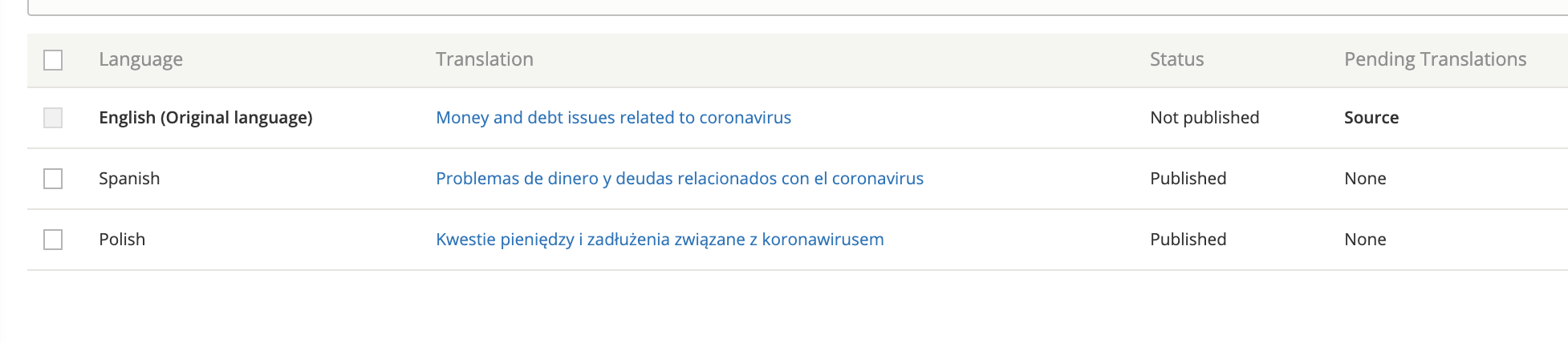
Selecting the unpublished state will unpublish the content for the language currently being edited. For example, if I unpublish from the English edit form, the English translation will be unpublished. Spanish and Polish will still be published.
Viewing the English edit form will show a current moderation state of “Unpublished” but Spanish and Polish will show “Published.”
Warning
To unpublish the content completely, you must go to the translate tab to edit and unpublish Spanish and Polish translations individually.
Access to Unpublished Content
The following users can view unpublished nodes:
Staff
Interns
Legal aid members
Pro bono members
The expansiveness of the view unpublished content is required to allow legal aid members and pro bono members to edit legal content.
A note about redirects
Redirects from a path alias will only redirect that path alias (so a url of /legal-information/english-title to /node/1 will only redirect the English title but will not impact /es/legal-information/spanish-title).
A redirect from /node/2 to /node/1 will redirect for all languages.