ILAO

Contents:

  • Design & Style Guide
  • Custom blocks
  • User Management
  • Browsing to legal information
  • Legal Content CMS
    • Law tracker
    • WYSIWYG Tools
    • Custom Tokens
    • Creating redirects between pages
    • Content management tags
    • Legal content type
      • Legal content formats
      • Annual Updates
      • Workflow Moderation States
      • Scheduling Revisions
      • Tagging content
      • Related content
      • (Related) Forms
      • Content Restrictions
      • Dates on Content
    • Next generation content/COPE
    • Portal main page content type
    • Toolbox, Toolbox tools & Toolbox steps
    • Lawyer Manuals
    • Notification and Content Dashboards
    • Legal content reporting
    • Legal Content Volunteers Program
    • Known Workarounds
  • Next generation content/COPE
  • Basic pages
  • Testimonials Content Type
  • Webforms
  • Translation Management
  • Calendar
  • Job Listings
  • Discussion groups
  • Get Legal Help
  • Helpful Organizations
  • Site Search
  • Site FAQs
  • Other Website Features
  • Taxonomies
  • RSS Feeds
  • ILAO’s API
  • NextSteps Flows
  • SMS Overview
  • Data and Analytics

See also:

  • Creating new docs in Github
ILAO
  • Legal Content CMS
  • Legal content type
  • View page source

Legal content type

The legal content type is the content type for the bulk of our legal information.

Contents:

  • Legal content formats
  • Annual Updates
  • Workflow Moderation States
  • Scheduling Revisions
  • Tagging content

Related content

Related content, labeled “Learn More” is pulled from one of two places, depending on the legal content:

  • For legal content that is included in a Guide, the learn more is pulled from the parent Guide’s learn more field

  • For legal content that is not included in a Guide, the learn more is pulled from the Recommendations field. Content managers can add or edit the Recommendations field.

(Related) Forms

A forms block (previously related forms) is added to legal information pages based on the taxonomy term(s) associated with the legal content.

Note

We are considering another option to make it so that the forms block can be manually created rather than pulled by taxonomy term.

Content Restrictions

Content may be restricted:

  • IICLE content is always restricted REGARDLESS of any manual settings.

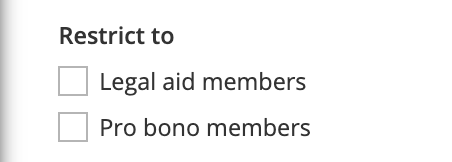
  • Other types of legal content may be restricted to legal aid members, pro bono members, or both by using the Restrict to field
_images/cms-legal-content-restrict.png

When these are checked:

  • Staff or legal aid members may access content restricted to legal aid members

  • Staff or pro bono members may access content restricted to pro bono members

  • Staff, legal aid members, and pro bono members may view restricted content when both checkboxes are checked.

Note

When content is restricted by role, it can also only be edited by users with that role. A legal aid member editor can not edit content that is restricted to only pro bono members for example.

Dates on Content

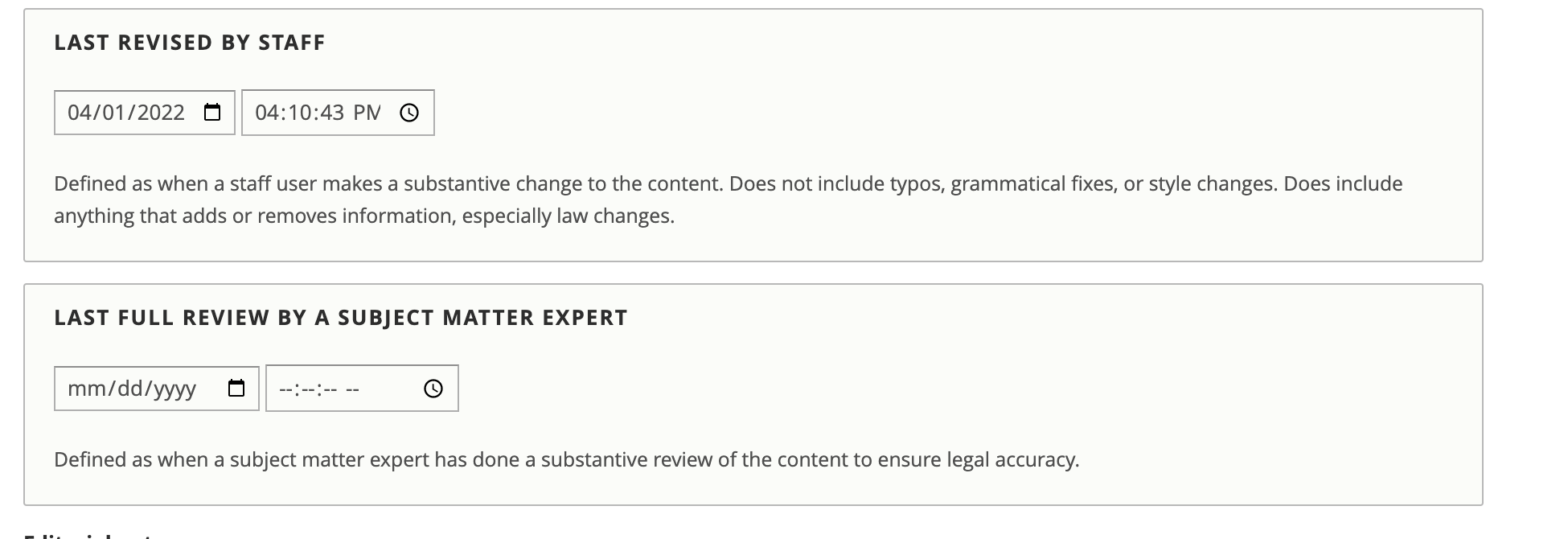
There are four dates that impact content:

  • Created date. This is the date the content was created. This can (but shouldn’t be except in exceptional circumstances in the authoring section on the content edit form)

  • Last updated date. This is a system-generated date created every time a node is changed in anyway.

  • Last revised by staff.

    • This is set manually by staff.

    • Defaults to the current date/time on new content but is not changed on future edits unless it is manually changed.

    • This appears on legal content as the Last revised date.

    • The date should be changed whenever a staff user makes a substantive change to the content.

      • Does not include typos, grammatical fixes, or style changes.

      • Does include anything that adds or removes information, especially law changes.

  • Last reviewed by a subject matter expert. This is set manually by staff. This appears on legal content as the Last reviewed date. Defined as when a subject matter expert has done a substantive review of the content to ensure legal accuracy.

Note

The last reviewed date may be changed even if no actual changes were made to the content, which can happen if the content is still legally correct.
_images/cms-legal-content-dates.png

Note

The last revised and last reviewed dates are not translatable. The dates apply to all translations of a piece of legal content.

See also:

  • Content Team Documentation

Previous Next

© Copyright 2023, Illinois Legal Aid Online.

Built with Sphinx using a theme provided by Read the Docs.