Content style guide
Titles
Capitalization
Use sentence case, not title case: YES: “Getting child support” NO: “Getting Child Support”
Length
60 characters or less.
Standard formats
The standard format depends on the content type.
Guides: should be titled with “basics” at the end or Understanding x (optionally as a y)
Divorce basics
Understanding eviction as a tenant
Understanding eviction as a landlord
SNAP basics
Warning
Many Guides do not follow this standard currently. As we work on transforming content, that should be revisited.
For DIY Legal Solutions, titles should be user-centric. Examples may include:
I need help lowering my rent
My SNAP benefits were cut
Someone stole my identity
For Legal solutions/how-tos, the titles should be action oriented
Participate in the case,
File for Chapter 13 bankruptcy
Create a safety plan, including someplace to go
Legal questions should be written as questions:
What is domestic violence?
How much in SNAP benefits can I get?
Legal steps should be action oriented:
Fill out your forms,
File your forms,
Go to your hearing,
Wait.
Easy form landing pages should be titled with the name of the packet:
Divorce
Financial Affidavit
For all content types
Do not include the content type (“video,” “easy form,” etc.) in the title. It will be added by the website automatically where necessary like in search results.
Only include jurisdiction on standard legal content type where the entire article applies to a specific location other than all of Illinois, unless it is an IICLE that contains Illinois in the title.
Yes: Dealing with bed bugs in Chicago
Yes: Dealing with bed bugs in Kane county
No: Dealing with bed bugs in Illinois
Yes: Illinois civil practice (IICLE)
Note
DIY Legal Solutions and their associated legal solutions and legal how-to should replace the existing How to sub-content type.
Warning
Preserving URLs when changing titles - When changing a title, uncheck the box next to “Generate automatic alias” so that the URL stays the same. This is so that our Google Analytics tracking for the page will be preserved.
Descriptions
We have 2 different description fields:
Meta description - this is used in Metatags so they are used by Google, Facebook, and Twitter in creating search results, snipppets, and automatic sharing on social media platforms.
Content description is used in the navigation drill-downs and in the Solr search results.
Note
The meta descriptions will get used in site search when we move to Google site search; at that point we may start to consider deprecating the content description field.
Good meta descriptions are short blurbs that describe accurately the content of the page. They are like a pitch that convince the user that the page is exactly what they’re looking for. They should provide additional “information scent” for the user to decide if this is the help they are looking for. While the content and meta description can be the same, they do not have to be. The meta description is especially important because it, along with the title, may be all the user sees to decide if this is the page they want to go to.
Note
In the examples, the better options are user-centric. This is a shift from our approach of starting descriptions with “Explains.”
Descriptions should not repeat/mimic the title.
Examples
Divorce basics
Bad: The basics of how to get a divorce
Bad: Explains the basics of divorce
Acceptable: Explains the basics of divorce, including requirements, timeline and fees.
Better: Learn about the requirements, timeline, and what happens during a divorce.
DIY Legal solution: I have a cannabis arrest or conviction
Bad: Explains what to do if you have a cannabis arrest or conviction.
Good: Explains your options for clearing a cannabis arrest or conviction.
Better: Explains your options and provides step-by-step instructions for clearing a cannabis arrest or conviction.
Best: Use these steps to clear a cannabis arrest or conviction.
DIY Legal solution: I don’t feel safe because of my partner, family member, or someone in my household
Bad: Explains what to do if you don’t feel safe.
Good: Explains how to use an order of protection to keep yourself safe.
Better: Explains what domestic abuse is and the legal tools you may have to get help.
Also better: Understand what domestic abuse is and how the law can protect you.
Best: Use orders of protection to protect yourself from abuse.
DIY Legal solution: I am being evicted because I did not pay the rent
Bad: Explains what to do if you are being evicted because you did not pay the rent
Better: From negotiating with your landlord to going to court, you have options if you are being evicted.
End each description with a period.
In general, do not use “more” or “etc” at the end of the description.
Legal difficulty
Appears in Legal options (solutions) indicates how difficult the solution is to do on your own, as determined by the content team. Example legal difficulty statements:
“We rate this an easy task in most cases. Fill out the form and file it with the court. No court appearance is generally required.”
“We rate this as a moderate task in most cases when our Easy Forms are used. You will likely have to appear in court.”
“We rate this as a moderate task in most cases. If you are not a legal resident or citizen, do not do this task without a lawyer.”
“We rate this as a difficult task in most cases. We recommend getting legal advice from a lawyer.”
Legal category tagging
Primary legal category
Pick the top-level category that you think best fits the content.
Primary secondary legal category
Pick the 2nd level category that best fits the content. This is used for internal reporting and for helping to recommend subject matter experts from Salesforce [future enhancement]
Image
Every piece of content that is directly accessible should have an image associated with it. This will be displayed on social media and other places the content is shared.
Many images are already loaded into the website and can be re-used.
If you are using a new image:
Use iStock to find a photo that is engaging and describes the content. Download the Small version and put it on Team Drive in the “Stock photos for content” folder in the appropriate sub-folder.
The images that will work best are horizontal images with the subject(s) in the center of the image. If the subject is on the outer edge it could be cropped out so adjust the photo yourself using a crop tool.
Note
individual steps and legal forms are not directly accessible by end users; they are only accessed as part of a solution or how-to.
Legal position
Use “Neutral” unless the content is only talking about one side in a legal proceeding. For example, if the content is telling the user how to change your name, you would set this to Plaintiff. If the content is talking about how to defend against a debt collection lawsuit, set this to Defendant (but note that if the content is talking about the other side - how to collect a judgment - it would be Plaintiff).
For DIY Legal Solutions, these are almost always written with a particular side in mind and should rarely be marked neutral.
Be careful to use the actual position in the case. For example, for criminal records, you are the plaintiff, because you are filing a petition to expunge. You are not the defendant (even though you were in the criminal case).
Content level
Use “Advanced” if the content is clearly talking to lawyers. For example, it talks about working with a client.
Otherwise, use “Basic.”
Restrictions and exclusions
Only restrict to Legal Aid users if it is an IICLE. Otherwise do not use that field. A small exception may exist for video content that is contributed by an organization and specifically ask that it be limited to the legal aid or legal aid/pro bono audiences.
Jurisdiction
Most of our content is “All of Illinois,” but if the content applies to federal law (Immigration, Bankruptcy, etc.) or only a specific locality (usually Cook County or Chicago) you can indicate that here.
For structured content, there are 2 separate jurisdiction fields:
Jurisdiction is used to set the overall jurisdiction and should be set to the largest applicable area.
Negate jurisdiction is optional and can be used to exclude a county, city, or zip code(s) from the jurisdiction.
Examples:
A solution applies to all of Illinois. It should have a jurisdiction of Illinois and negate jurisdiction removed.
A legal step applies to Cook county except for the city of Chicago. It should have a jurisdiction of Cook county and a negate jurisdiction of Chicago.
A legal step applies to all of Illinois except for Cook county. It should have a jurisdiction of Illinois and a negate jurisdiction of Cook county.
Note
See Coverage area for specific jurisdiction use cases (when to use create jurisdiction-specific how-tos vs jursidiction specific steps for example)
Writing content
Referrals within legal content
Within legal content (not a structured content format)
Use legal difficulty language where appropriate.
Do not include referrals to legal organizations, social services, or community organizations within the text of content
Within structured content format
Do not include sentences like “It is best to do this with a lawyer”
Do not include referrals to legal organizations, social services, or community organizations within the text of content
DO use the legal difficulty field to rate the solution; this will ensure consistency across content
DO add social service or community organizations that ILAO has partnerships with for referrals as Helpful Organization content and link to these in the legal solution
DO add ILAO as a legal organization if OTIS partners routinely take cases
DO add hotline/help desk services as legal organizations when relevant
Headings/Subheadings
Subheadings should be used as they are helpful to a user when scanning a page. There are 3 levels of subheadings:
Heading 3 (h3),
Heading 4 (h4), and
Heading 5 (h5).
There must be atleast one h3 before an h4, and at least one h4 before an h5.
Warning
Headings should not be used solely for the purpose of style! They should be used to organize the legal information.
You can use headings and subheadings instead of using nested bullets, if the bullets go more than two levels down.
Note
While we use both unordered (bulleted) lists and ordered (numbered) lists, ordered lists should never be used in place of a subheading.
When deciding between using bullets and using subheadings:
use bullets when
the text of the items are 2-3 sentences or less, or
when it is a series of items in a list or sequence.
Use subheadings when * they are different aspects or considerations under the same parent heading, or * when the items are more than 3 sentences.
Structured content formats
The same general style rules apply to structured text. Additional considerations:
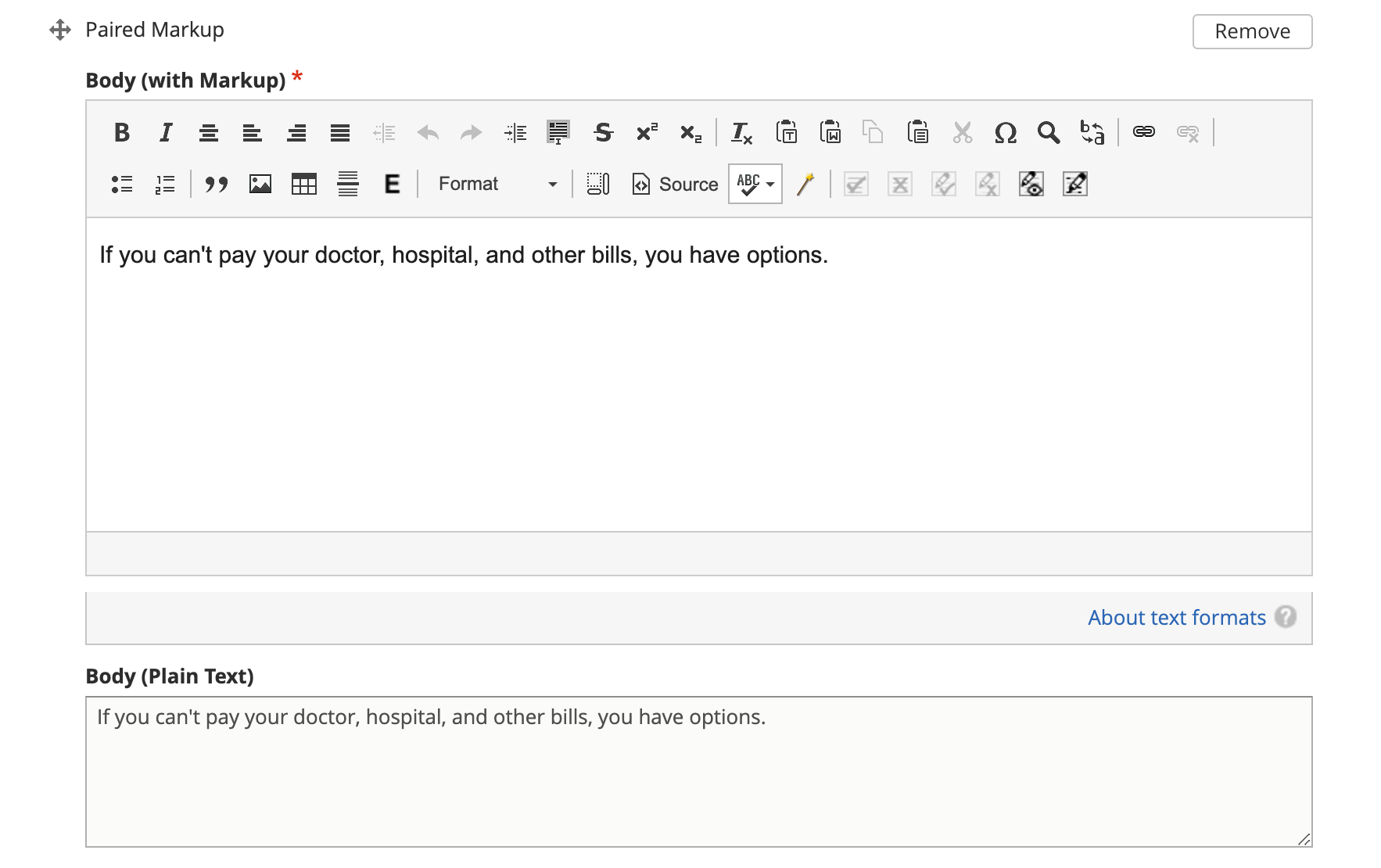
When working with paired markup,
Bulleted lists, if they otherwise comply with this style guide, may be used. If working with a structured text block that allows for structured lists, those should be used instead of bulleted lists within a paired markup element.
Keep the length to less than 1000 characters, ideally shorter.
Limit each paired markup element to one idea, point, or paragraph
Note
Paired markup is a field type in structured content where the content author/editor creates standard HTML text and the system pairs it with a plain text version that can be used on platforms other than the web.
Using tables
Tables should have at least 2 or more rows and 2 - 4 columns (4 or more columns are difficult to read). Use sentence case for table titles and column headings.
Note
Tables should be used sparingly as they do not render well on mobile. The tables will be responsive but may squish the text to accommodate. Consider mobile accessibility in designing tables.
Glossary terms/definitions
Try and avoid using terms that need to be defined.
If the word/term needs a definition:
define it using plain language once in the content, if it is a short definition. If the word/term is used more than once in the content, make sure it is included in the glossary as we will rely on the glossary for the times it is used after it is first defined.
consider making it a legal question that can be linked to, if the definition needs to be more than one sentence long. For example, the definition of economic abuse is multiple sentences and includes a bulleted list and is better suited as a legal question that can be linked to in articles rather than defined multiple times in individual guides or solutions.
Note
Glossary terms can include links to further information in the form of a legal question. For example, “Domestic violence may include economic abuse” that then links to the economic abuse legal question.
Todo
Add reference to adding glossary terms.
Point of view
Use 3rd person when giving general information, or when using 2nd person would be confusing or would result in awkward phrasing. Use 2nd person when you are giving the user instructions. Often, an article will start in 3rd person (because it’s general information) and then shift into 2nd person when the info becomes more specific and you start giving instructions.
Good example
When parents live in different states or a child and their parents move from one state
 to another, there are laws about which state’s courts can decide issues about the
 custody of the child. [3rd person because it is general info and using 2nd person
 would be awkward] [a few sentences later...] If jurisdiction is an issue in your
 case, you should talk to a lawyer. [2nd person because it tells the user to do
 something]
Bad example
When you are a parent and you live in a different state as the other parent or your
child and you and the other parent move from one state to another, there are laws
about which state’s courts can decide issues about the custody of you child....
Formatting
Italics
Italics should be used only for:
Court form names. This includes shortened versions of their names. For example, if you refer to a Notice of Appeal as “the Notice” later in the article, you would still italicize it.
Editorial notes (like at the very beginning of a blog post where we give the author’s byline).
Legal citations, case law, and book titles.
Bold
Only bold individual words or phrases; never bold an entire sentence or paragraph. Use for the rare instance of subheadings in an article, or when there is an important deadline, alert or notice for the reader to note.
ALL CAPS
Don’t ever use.
Bulleted and numbered lists
Use bullets (unordered lists) when there is no sequence to the items
Use numbers (ordered lists) when there is
Introduce bullets/numbers with a sentence or fragment followed by a colon.
If it starts with a fragment, the items in the list should be fragments, and should complete the sentence.
If it starts with a complete sentence, the items can either be fragments or sentences.
Always:
Capitalize the first word following the bullet point/number.
Put a comma at the end of each item, even if there are commas within the item itself.
Use “and” or “or” as appropriate at the end of the second-to-last item. Put a period at the end of the last item.
EXAMPLE:
The judge will:

* Hear both sides,
* Make a decision, and
* Sign an Order.
There should only be one hierarchical level for bullet lists. A second level may be used only when absolutely necessary. (See Page Design in Content Design London’s Readability Guidelines.)
Bulleted and numbered lists in structured content formats
Grammar and Usage
Voice
Use active voice as much as possible.
Verb tense
Use present tense as much as possible.
Contractions
Contractions are acceptable when used for plain language. Do not use informal contractions.
Formal contractions include: can’t, won’t, shouldn’t. They use a single apostrophe. Informal contractions include: gonna, watcha, wanna. They do not use a single apostrophe.
And/Or
Do not use “and/or” where it will cause confusing ambiguity. Use it sparingly if it avoids confusion between two or more equally viable options.
He/She/Them
Do not use he/she or he or she. Use gender neutral terms (they, their, them).
It is OK to use plural gender neutral pronouns for singular objects, as in “The judge will make their decision.
Punctuation
Colons
Use at the end of a sentence or fragment that introduces a list.
Semi-colons
Do not use semicolons. Separate into two sentences with a period.
Commas
A period is better than a comma, but a comma is better than no comma.
Use the oxford comma in a series consisting of three or more elements, separate each element with a comma.
Example: Diversity, equity, and inclusion. NOT: Diversity, equity and inclusion.
Double quotes
Double quotes should be used when introducing/defining a word for the first time.
Periods
Use periods at the end of each sentence.
Do not use periods when items appear in bulleted lists. Instead, use commas. (see “bulleted lists” above)
Hyphen Hyphenate two or more words that precede and modify a noun as a unit if confusion might otherwise result. Do not hyphenate for adverbs ending in “ly.”
Do not use
Exclamation points
Single quotes (use double quotes)
Semi-colons (separate into two sentences with a period)
Parentheses. Avoid using them. They are confusing to people with lower reading levels.
Em dash
Slash. Use ‘and’ or ‘or’ instead.
Ampersand (&)
En dash Use to indicate a range. Do not space on either side of an en dash.
Capitalization
Capitalize proper names
Capitalize specific courts or judges but do not capitalize when speaking generally of court, judges, or clerk. For example:
Judge Joe Smith
the judge on the case
The Illinois Supreme Court
the court in your county
Criminal offenses are not capitalized.
Organization names should use title case
Circuit Clerk, Court Clerk, or Clerk should never be capitalized. Use ‘circuit clerk’, ‘county clerk,’ or ‘clerk’.
Numbers & Currency
Spell out ‘zero’ and ‘one’; use digits otherwise.
Use commas in numbers of 4 or more digits.
Use dollar sign. Only use decimals if there are cents (not “.00”).
Fractions are preferred over decimals and should be written as 1/2, 1/4, 1/3. Avoid using the single fraction characters, like ½, as they do not render properly across all platforms. If they start a sentence, they should be spelled out:
One-third of the group have multiple convictions
In the group, 1/3 have multiple convictions
If in doubt, follow the AP style guide.
Phone number format
“(555) 555-5555”
Phone numbers can also be hyperlinked. The correct way to link a phone number is <a href=”tel:555-555-5555”>(555) 555-5555</a>
Dates
Spell out month, xx day, xxxx year (American English); xx day, month, year (non-English).
Examples:
May 7, 2021
November 12, 1984
Hyperlinks
Don’t hyperlink words like “click here” or “more.” Instead, hyperlink the specific words (preferably nouns) that describe the information on the page being linked to. For example: “Find more information on the Illinois Courts website.”
Connecting to external resources
Note
Always link when you can over downloading and storing on our website.
In other words, if there is a PDF we want to create content for, we should try to create a “link” form to the URL where that form is hosted on an external site like a circuit clerk’s site, instead of downloading the form and re-uploading as a “download” form. This is so that if the form is updated we will be alerted because the link will break.
External links
External links should only be used to send users to forms or resources on pages that are run by government agencies or reputable non-profits. Do not link users to private attorneys’ websites, political websites, or generic informational websites (like ask.com or wikipedia).
Links to legal authority
When linking to Illinois statutes, link to the ILGA website’s version. Bring people to the Article level, or Title level if Article is unavailable.
For federal statutes, link them to the LII website https://www.law.cornell.edu/.
For caselaw, link them to Google Scholar.
Links to Statewide Forms
When you refer to a Statewide Form, hyperlink the name of it to the AOIC page for that form suite (or that specific form) the first time you refer to it. After that, you don’t need to hyperlink it each time.
Note
If ILAO has automated the statewide form, we should reference our Easy Form instead. The Easy Form landing page will have the link to the AOIC PDF version as well.
Legal Citations
Citations should use Blue Book format.
Citations should be used within Advanced content.
Citations should be included in structured content formats.
Citations are not included in basic legal content.
Note
Regular legal content does not currently support citations. As we move to structured content, citations may be made visible to users.
Examples
Rental Property Utility Services Act, 765 ILCS 735.
Fair Housing Act (FHA), 42 U.S.C. § 3604
Chicago Residential Landlords and Tenants Ordinance. Chicago Municipal Code, Title 5, Chapter 12 (CRLTO)
People v. Evans, 163 Ill. App. 3d 561, 564 (1st Dist. 1987)
55 ILCS 5/3-6019
Soldal v. Cook County, Illinois, 506 U.S. 56, 58 (1992)
Specific Content Formats
File content
All files should be uploaded in PDF format. For forms, link to the clerk’s website if possible rather than attaching a file.
Naming conventions for uploaded files - images, docs, pdfs, etc. all_lowercase_with_underscore and no more than 64 characters.
Videos
If we have a recording of recent legal training or have produced a video internally, it should be posted to to YouTube and then embedded in a piece of content. If the video is of a training, and the speaker used a powerpoint, that powerpoint should be posted with the video. Other materials that were used by the speaker, like forms or other samples, should also be posted.
Forms
Include a link to another piece of content that explains how to use the form in the “Qualifications” section. This is usually the “Big Picture” article in the related bundle, but it could be another article.
When referring to Easy Forms, say “Easy Form program” or simply “Easy Form.” Do not use any of the following:
Interview
Automated document (or “autodoc”)
Form preparation program
A2J
AutoDoc
Legal solution
Eligibility rules
Eligibility rules should be discrete and help the user understand whether a specific solution applies to them. It should:
Include specific legal rules that apply to the solution Examples: * You must not have filed for bankruptcy in the last 3 years * You must have gross income of less than 200% of the Federal Poverty Level * You must have lived in Illinois for the last 6 months * You were never served notice by the landlord
Include warnings where applicable
If you are collection-proof (link to definition), this option may not help you.
If you are not a US citizen, talk to a lawyer before using this solution. It could impact your status.
Result
The result field should contain information that encourages the user to take the action if it applies to them. This should include content under headings like:
Why should I do this?
Why shouldn’t I do this?
What can’t this do for me?
What can this do for me?
Legal step
Legal steps are comprised of directions and tips.
A direction may have multiple paired markup segments to allow us to parse and deliver long blocks of text. A direction should be around a single action. For example a step may have:
A direction to file specific bankruptcy forms
A direction related to waiving court fees
A tip indicating the amount of the court fee
Note
It is better to break a long direction into multiple segments so that they will work across channels beyond the web.
Don’t put all the directions in 1 direction. For example, if filling out forms requires one to:
Fill out the forms
Sign them
Make copies
Those should be 3 separate directions.
If a segment does not ask the user to do something, it should most likely be a tip.
Images
Alt text
Give every image descriptive alt text, which helps people using screen readers understand the page more fully. Name images using descriptive text; do not use the image name as alt text. Yes: Picture of a woman walking on a bridge. No: img78080_woman_on_bridge.jpg
Composition
The images that will work best are horizontal images with the subject(s) in the center of the image. If the subject is on the outer edge it could be cropped out so adjust the photo yourself using a crop tool. Think about the person who may want to read this content and focus on them when selecting an image.
Reading level
Target reading level is 6th-8th grade. The reading level will be assessed by running a Flesch-Kincaid test using Readable.io (see Operations site for username and pw). If you cannot get the readability to a 6th-8th grade reading level, see the Legal Content Director for assistance.
Note
There are other tools, like the WriteClearly plugin that you can use to evaluate readability as well.
People-first language
If you are using a word to describe a person, put the word after the word “person.” YES: Person with a disability NO: Disabled person
Acronyms
Spell out first instance of the acronym in each individual article; do this by writing, not by using parentheses. Some acronyms are better known than their full, formal names (“SSI,” for example) but should still be spelled out in their first instance.
Example: You can apply for Supplemental Security Income, or SSI, through the Social Security Administration (SSA). SSI provides income for persons with a disabiliy.
Specific use cases
Judgement v Judgment - Use “Judgment.”
PM/AM vs P.M. A.M. vs pm am - Use: AM and PM (no periods)
“Judge” instead of “court” - Despite this common usage in legalese, do not refer to the judge as “the court.” Only say “the court” if you are talking about the actual courtroom or courthouse.
Stepparent vs step parent - Use stepparent because it is the more frequent search term on Google.
COVID-19 v. Covid-19 - Use “Covid-19” instead of “COVID-19.” This is the New York Times approach and it avoids using capitals which is preferred for readability.
Abbreviate United States as “US” with no spaces or period
ID - use ID (not id, Id)
Roska articles -
the title of the article must comply with the ILAO Style Guide.
Next, keep this at the beginning of each Roska: The following question was/questions were (pick appropriate one for article) submitted to John Roska, an attorney/writer whose weekly newspaper column, “The Law Q&A,” runs in the Champaign News Gazette.
Then, include the following two headings: (1) Question [H3] and write question(s) underneath this heading and (2) Answer [H3] and write answer underneath this heading
Editorial tracking
Annual updates
Only use this section if there is information in the content that will change regularly.
This includes:
Legal content that contains the minimum wage
Legal content that contains dates that change year to year
Legal content that contains income levels or benefits levels that change each year
Do not tag these just because the content deals with that issue - only if something in the content is definitely going to change regularly.
Work logs
Revision logs should be used to indicate what work was done when a revision is created
Editorial notes
Most legal content types include an optional editorial notes field. This can be used to make additional notes on a piece of content that may be helpful for someone to know about. Some examples:
This content replaces our cannabis expungement toolboxes
This content was unpublished on 1/2/2023 because it was out-of-date
This content may need to be combined with another article but we didn’t have time to do it
Author/Subject matter expert
This was originally added for the blog. It can be used to tag who has ever touched it as a subject matter expert so that we can build out our SME pool.
Content management tags
These were initially created and can be used to track content to specific grants. For example, most of our cannabis-related content have the canEx tag so that we can pull that content in a single collection for reporting.
Metatags
Metatag standards are set by the system for the most part. They only require manual editing when the legal content is:
an Easy Form. Easy forms should have the title meta tags set to [node:title] [node:field_primary_content_type] | [site:name]
an DIY Legal solution will be titled with the DIY Legal solution tag
Legal solutions will be titled with just the title